Back Button

Visual Design • Interactive Learning • UX/UI Design • Prototyping

SPACE4KIDS — Interactive Solar System Learning Website

SPACE4KIDS is an interactive educational website designed to help children learn about the solar system through play, exploration, and visual engagement. Inspired by classic computer lab learning games, the project transforms planetary education into a game-like experience that supports visual, hands-on learners. The platform is designed for classroom use and independent exploration, allowing students to navigate between planets, complete quizzes, and interact with content in a fun, intuitive way.


To see the full site. Click above

Space4Kids link

Problem Statement

Many students struggle to learn complex scientific topics like the solar system through traditional textbook-based instruction. Planetary order, scale, and scientific facts can feel abstract and difficult to retain without visual and interactive reinforcement.

As someone who personally struggled with this topic growing up, this project was designed to:

  • Make planetary education more engaging
  • Support different learning styles
  • Encourage curiosity through interaction
  • Feel like a game, not homework


Solution

An interactive, kid-friendly educational website that blends:

  • Game-inspired UI design
  • Illustrated characters and planets
  • Simple navigation
  • Quizzes and feedback systems
  • Visual learning tools

The result is a playful learning environment that feels like a computer lab game rather than a traditional educational website.
 

Astronaut

Target Audience

  • Children ages 8–13
  • Elementary and middle school classrooms
  • Visual and hands-on learners
  • Teachers using interactive learning tools
  • Parents supporting at-home learning

Information Architecture & User Flow

The website follows a clear and intuitive structure that allows children to explore freely while always knowing where they are.


Navigation Structure

  • Persistent side menu with planet buttons
  • Each planet opens its own content section
  • Navigation always stays open for easy switching
  • Logo functions as a home button


Learning Flow

  1. User selects a planet
  2. Reads fun facts and information
  3. Views illustrations and animations
  4. Completes interactive quizzes
  5. Receives instant feedback
  6. Moves to the next planet

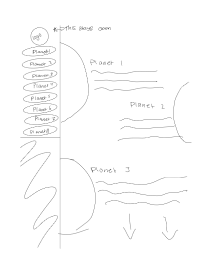
This structure was mapped using early flow diagrams and wireframe sketches to ensure clarity and ease of use for young users.


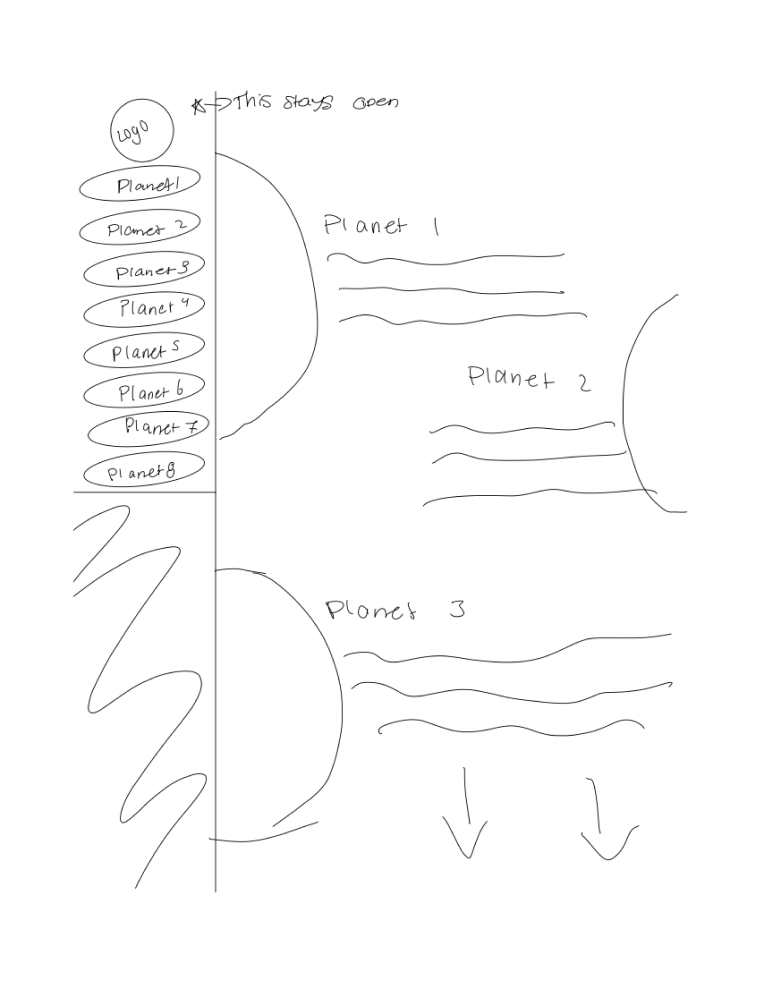
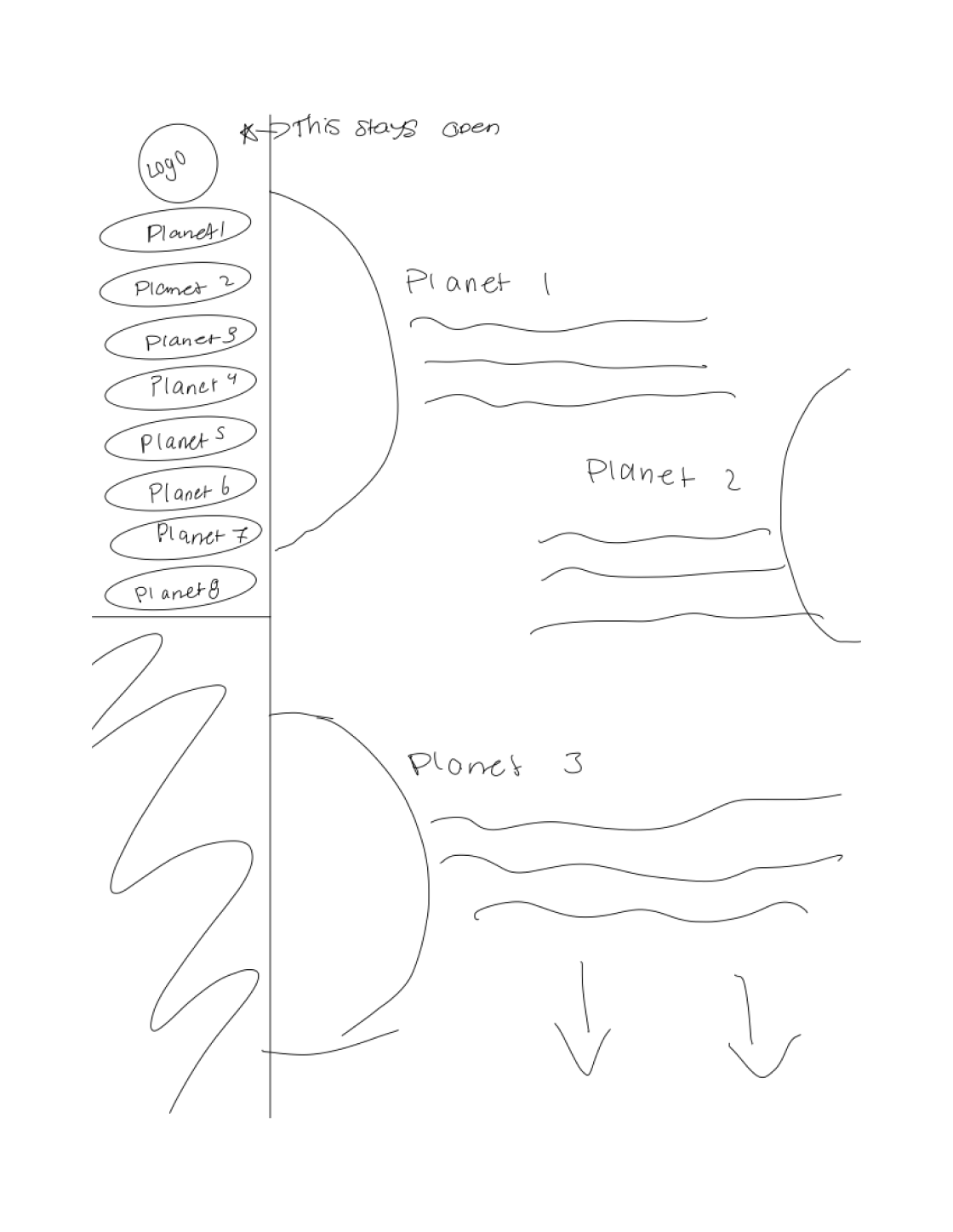
Wireframes & UX Planning

Early sketches and wireframes were created to map:

  • Menu layout
  • Planet content sections
  • Scroll behavior
  • Button placement
  • Quiz interactions


The wireframes explore:

  • Vertical scrolling content per planet
  • Persistent navigation menu
  • Clear separation between planets
  • Large clickable UI elements for kids

These layouts were later refined into high-fidelity designs in Adobe XD.
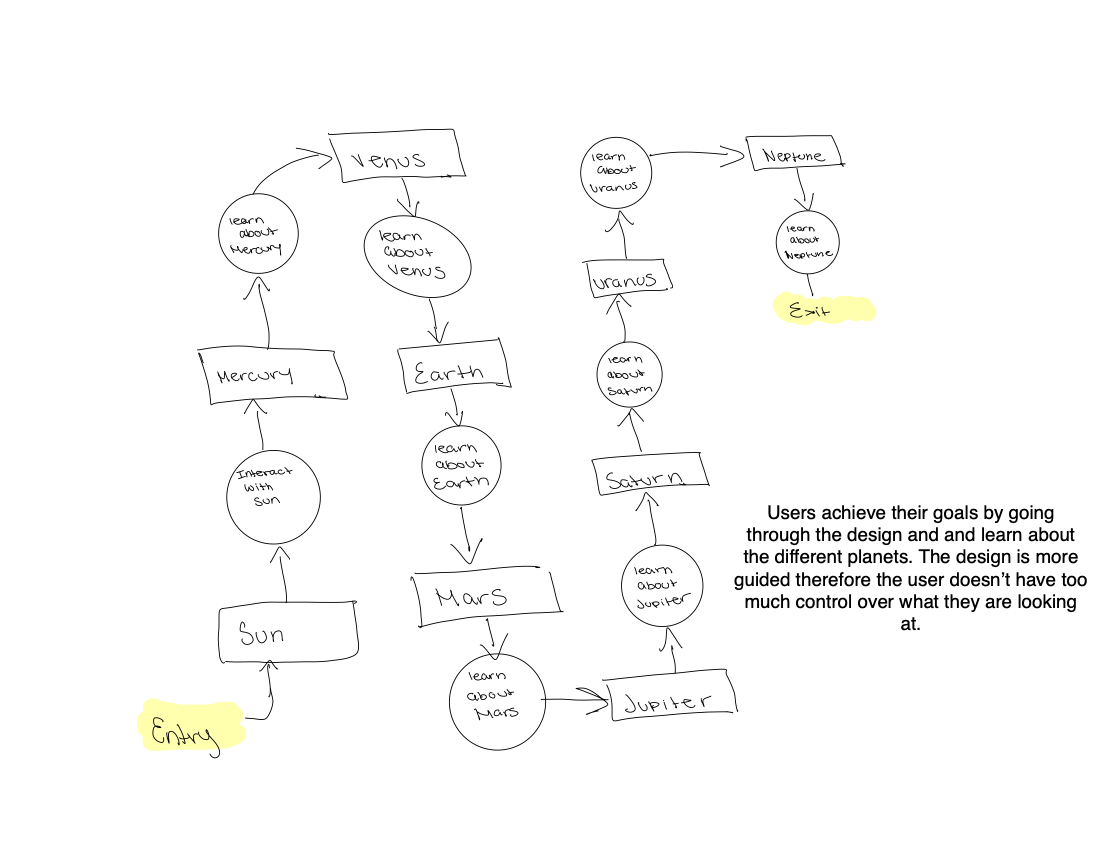
 

Flow diagram

Wireframes

Wireframe
Wireframe Sketch


Component Library

A full component system was designed to ensure consistency across the platform.
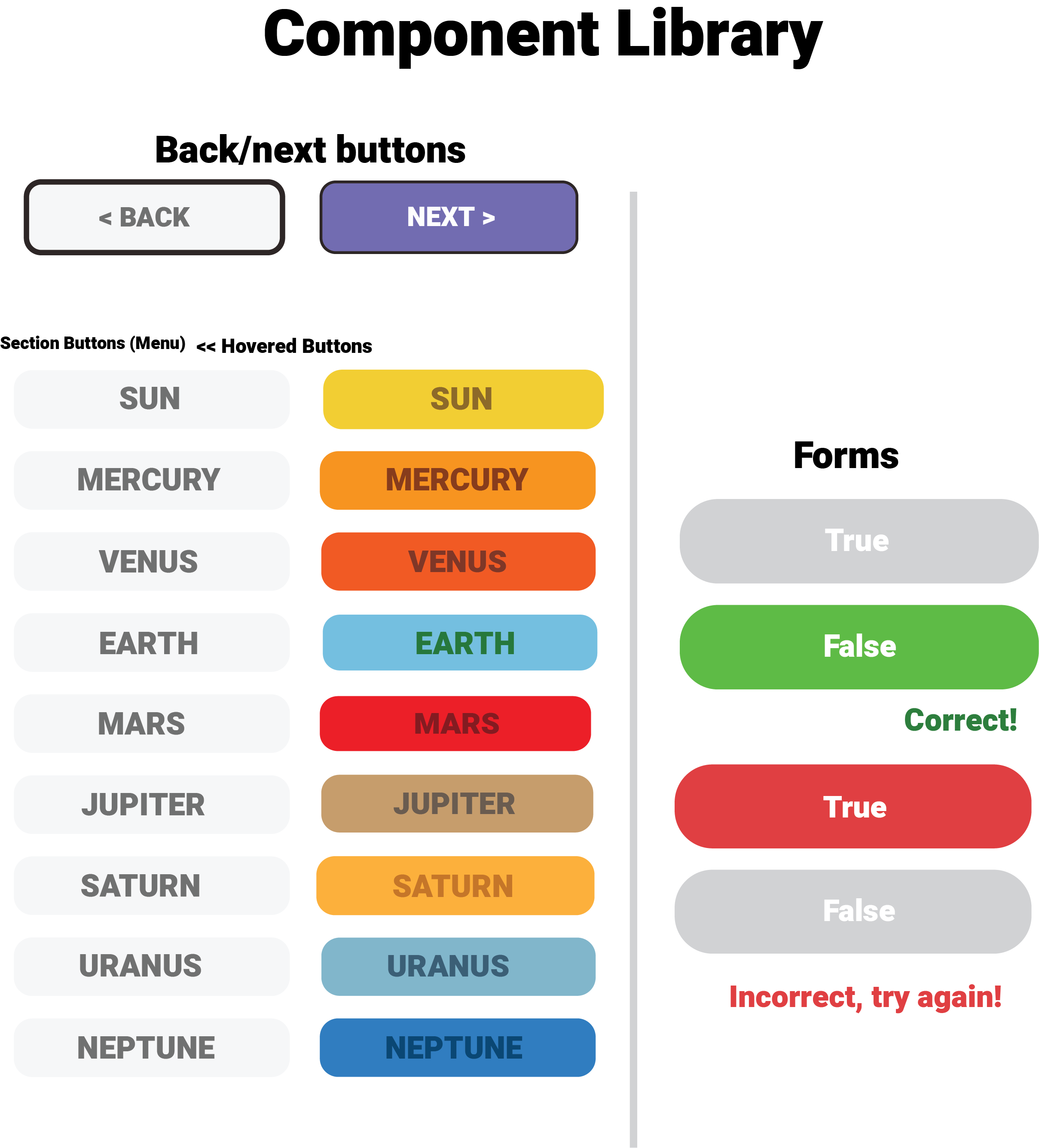
 

Component Library

Core UI Components

  • Back / Next navigation buttons
  • Planet section buttons
  • Quiz true/false buttons
  • Feedback messages (Correct / Try Again)
  • Icons (menu, home, arrows, info)


Interaction States

  • Default buttons
  • Hover states
  • Active states
  • Correct/incorrect feedback states

Each planet has its own color-coded button, reinforcing visual memory and recognition.


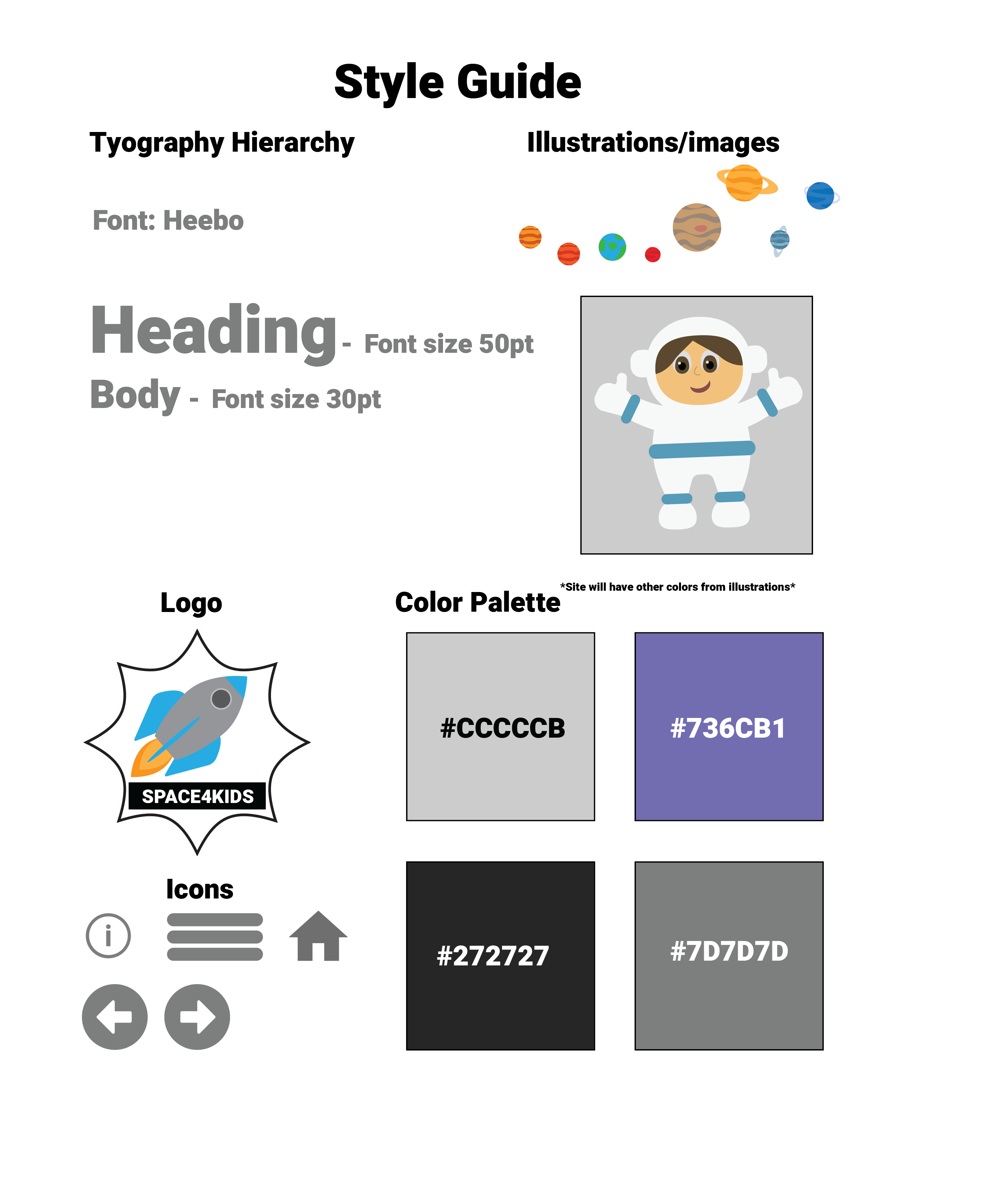
Visual Style Guide

StyleGuide
Style Guide

Interactive Design

Visual Tone

  • Friendly
  • Playful
  • Educational
  • Bright and inviting
  • Game-inspired

Prototype

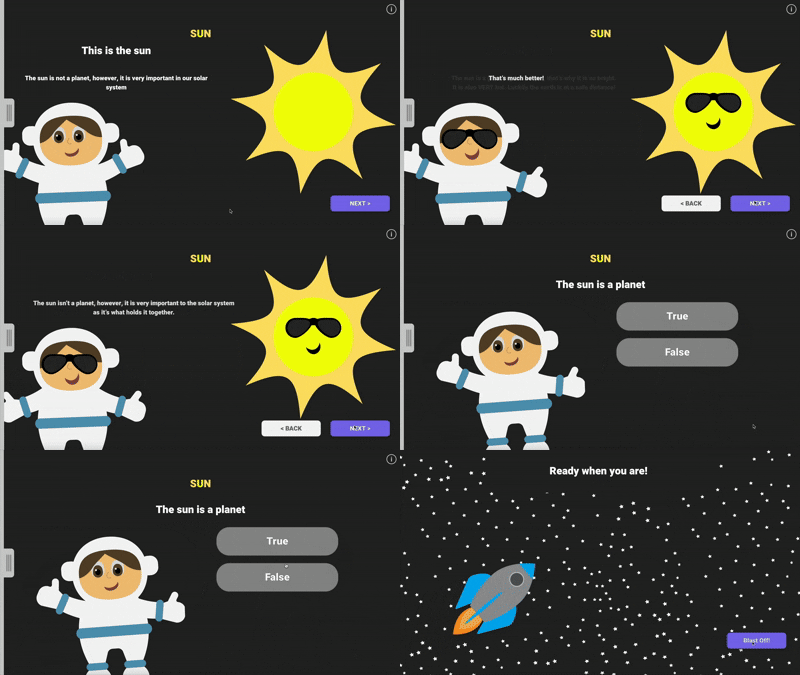
The full interactive prototype was designed in Adobe XD, featuring:

  • Clickable navigation
  • Planet sections
  • Quiz interactions
  • UI animations
  • Page transitions


Gameplay

Navigation

  • Large, easy-to-click buttons
  • Clear labels
  • Planet-based color coding
  • Back/Next progression


Quiz System

  • True/False or Multiple choice format
  • Immediate feedback
  • Positive reinforcement
  • Encouraging retry messaging

Learning Experience

  • Scroll-based exploration
  • Chunked content per planet
  • Visual reinforcement through illustrations
  • Simple language and layout


Tools Used

  • Adobe XD (UI/UX design & prototyping)
  • Illustrator (logo & illustrations)
  • Wireframing & UX sketching
  • UI component system design
  • Visual style guide development

Skills Demonstrated

  • UX/UI Design
  • Educational Experience Design
  • Interaction Design
  • Wireframing & Prototyping
  • Visual Design Systems
  • Component Libraries
  • Branding for Digital Products
  • Accessibility-aware layout design

Outcome:

SPACE4KIDS transforms a traditionally difficult science topic into an interactive learning experience that encourages exploration, curiosity, and fun. By combining game-inspired design with educational content, the platform supports visual learners and creates a memorable way for children to engage with the solar system.

 

See Next Project >>>

Back Button
portrait of woman

Cristina Lopera

Home

About

Contact

Visual Design • Interactive Learning • UX/UI Design • Prototyping

SPACE4KIDS — Interactive Solar System Learning Website

SPACE4KIDS is an interactive educational website designed to help children learn about the solar system through play, exploration, and visual engagement. Inspired by classic computer lab learning games, the project transforms planetary education into a game-like experience that supports visual, hands-on learners.

The platform is designed for classroom use and independent exploration, allowing students to navigate between planets, complete quizzes, and interact with content in a fun, intuitive way.


To see the full site. Click above

Space4Kids link

Problem Statement

Many students struggle to learn complex scientific topics like the solar system through traditional textbook-based instruction. Planetary order, scale, and scientific facts can feel abstract and difficult to retain without visual and interactive reinforcement.

As someone who personally struggled with this topic growing up, this project was designed to:

  • Make planetary education more engaging
  • Support different learning styles
  • Encourage curiosity through interaction
  • Feel like a game, not homework


Solution

An interactive, kid-friendly educational website that blends:

  • Game-inspired UI design
  • Illustrated characters and planets
  • Simple navigation
  • Quizzes and feedback systems
  • Visual learning tools

The result is a playful learning environment that feels like a computer lab game rather than a traditional educational website.


Astronaut

Target Audience

  • Children ages 8–13
  • Elementary and middle school classrooms
  • Visual and hands-on learners
  • Teachers using interactive learning tools
  • Parents supporting at-home learning

Information Architecture & User Flow

The website follows a clear and intuitive structure that allows children to explore freely while always knowing where they are.


Navigation Structure

  • Persistent side menu with planet buttons
  • Each planet opens its own content section
  • Navigation always stays open for easy switching
  • Logo functions as a home button


Learning Flow

  1. User selects a planet
  2. Reads fun facts and information
  3. Views illustrations and animations
  4. Completes interactive quizzes
  5. Receives instant feedback
  6. Moves to the next planet

This structure was mapped using early flow diagrams and wireframe sketches to ensure clarity and ease of use for young users.


Wireframes & UX Planning

Early sketches and wireframes were created to map:

  • Menu layout
  • Planet content sections
  • Scroll behavior
  • Button placement
  • Quiz interactions


The wireframes explore:

  • Vertical scrolling content per planet
  • Persistent navigation menu
  • Clear separation between planets
  • Large clickable UI elements for kids

These layouts were later refined into high-fidelity designs in Adobe XD.


Flow diagram

Wireframes

Wireframe
Wireframe Sketch


Component Library

A full component system was designed to ensure consistency across the platform.


Component Library

Core UI Components

  • Back / Next navigation buttons
  • Planet section buttons
  • Quiz true/false buttons
  • Feedback messages (Correct / Try Again)
  • Icons (menu, home, arrows, info)


Interaction States

  • Default buttons
  • Hover states
  • Active states
  • Correct/incorrect feedback states

Each planet has its own color-coded button, reinforcing visual memory and recognition.


Visual Style Guide

StyleGuide
Style Guide

Visual Tone

  • Friendly
  • Playful
  • Educational
  • Bright and inviting
  • Game-inspired

Interactive Design

Prototype

The full interactive prototype was designed in Adobe XD, featuring:

  • Clickable navigation
  • Planet sections
  • Quiz interactions
  • UI animations
  • Page transitions


Gameplay

Navigation

  • Large, easy-to-click buttons
  • Clear labels
  • Planet-based color coding
  • Back/Next progression


Quiz System

  • True/False or Multiple choice format
  • Immediate feedback
  • Positive reinforcement
  • Encouraging retry messaging

Learning Experience

  • Scroll-based exploration
  • Chunked content per planet
  • Visual reinforcement through illustrations
  • Simple language and layout


Tools Used

  • Adobe XD (UI/UX design & prototyping)
  • Illustrator (logo & illustrations)
  • Wireframing & UX sketching
  • UI component system design
  • Visual style guide development

Skills Demonstrated

  • UX/UI Design
  • Educational Experience Design
  • Interaction Design
  • Wireframing & Prototyping
  • Visual Design Systems
  • Component Libraries
  • Branding for Digital Products
  • Accessibility-aware layout design

Outcome:

SPACE4KIDS transforms a traditionally difficult science topic into an interactive learning experience that encourages exploration, curiosity, and fun. By combining game-inspired design with educational content, the platform supports visual learners and creates a memorable way for children to engage with the solar system.
 

See Next Project >>>

Back Button

Visual Design • Interactive Learning • UX/UI Design • Prototyping

SPACE4KIDS — Interactive Solar System Learning Website

SPACE4KIDS is an interactive educational website designed to help children learn about the solar system through play, exploration, and visual engagement. Inspired by classic computer lab learning games, the project transforms planetary education into a game-like experience that supports visual, hands-on learners.

The platform is designed for classroom use and independent exploration, allowing students to navigate between planets, complete quizzes, and interact with content in a fun, intuitive way.


To see the full site. Click above

Space4Kids link

Problem Statement

Many students struggle to learn complex scientific topics like the solar system through traditional textbook-based instruction. Planetary order, scale, and scientific facts can feel abstract and difficult to retain without visual and interactive reinforcement.

As someone who personally struggled with this topic growing up, this project was designed to:

  • Make planetary education more engaging
  • Support different learning styles
  • Encourage curiosity through interaction
  • Feel like a game, not homework


Astronaut

Solution

An interactive, kid-friendly educational website that blends:

  • Game-inspired UI design
  • Illustrated characters and planets
  • Simple navigation
  • Quizzes and feedback systems
  • Visual learning tools

The result is a playful learning environment that feels like a computer lab game rather than a traditional educational website.


Target Audience

  • Children ages 8–13
  • Elementary and middle school classrooms
  • Visual and hands-on learners
  • Teachers using interactive learning tools
  • Parents supporting at-home learning

Information Architecture & User Flow

The website follows a clear and intuitive structure that allows children to explore freely while always knowing where they are.


Navigation Structure

  • Persistent side menu with planet buttons
  • Each planet opens its own content section
  • Navigation always stays open for easy switching
  • Logo functions as a home button


Learning Flow

  1. User selects a planet
  2. Reads fun facts and information
  3. Views illustrations and animations
  4. Completes interactive quizzes
  5. Receives instant feedback
  6. Moves to the next planet

This structure was mapped using early flow diagrams and wireframe sketches to ensure clarity and ease of use for young users.


Wireframes & UX Planning

Early sketches and wireframes were created to map:

  • Menu layout
  • Planet content sections
  • Scroll behavior
  • Button placement
  • Quiz interactions


The wireframes explore:

  • Vertical scrolling content per planet
  • Persistent navigation menu
  • Clear separation between planets
  • Large clickable UI elements for kids

These layouts were later refined into high-fidelity designs in Adobe XD.


Flow diagram

Wireframes

Wireframe
Wireframe Sketch


Component Library

A full component system was designed to ensure consistency across the platform.

Component Library

Core UI Components

  • Back / Next navigation buttons
  • Planet section buttons
  • Quiz true/false buttons
  • Feedback messages (Correct / Try Again)
  • Icons (menu, home, arrows, info)

Interaction States

  • Default buttons
  • Hover states
  • Active states
  • Correct/incorrect feedback states

Each planet has its own color-coded button, reinforcing visual memory and recognition.


Visual Style Guide

Style Guide
StyleGuide

Visual Tone

  • Friendly
  • Playful
  • Educational
  • Bright and inviting
  • Game-inspired

Interactive Design

Prototype

The full interactive prototype was designed in Adobe XD, featuring:

  • Clickable navigation
  • Planet sections
  • Quiz interactions
  • UI animations
  • Page transitions


Gameplay

Navigation

  • Large, easy-to-click buttons
  • Clear labels
  • Planet-based color coding
  • Back/Next progression


Quiz System

  • True/False or Multiple choice format
  • Immediate feedback
  • Positive reinforcement
  • Encouraging retry messaging

Learning Experience

  • Scroll-based exploration
  • Chunked content per planet
  • Visual reinforcement through illustrations
  • Simple language and layout


Tools Used

  • Adobe XD (UI/UX design & prototyping)
  • Illustrator (logo & illustrations)
  • Wireframing & UX sketching
  • UI component system design
  • Visual style guide development

Skills Demonstrated

  • UX/UI Design
  • Educational Experience Design
  • Interaction Design
  • Wireframing & Prototyping
  • Visual Design Systems
  • Component Libraries
  • Branding for Digital Products
  • Accessibility-aware layout design

Outcome:

SPACE4KIDS transforms a traditionally difficult science topic into an interactive learning experience that encourages exploration, curiosity, and fun. By combining game-inspired design with educational content, the platform supports visual learners and creates a memorable way for children to engage with the solar system.


See Next Project >>>